Notebook Cover and Lined Pages Template: A Flexible, Print-Ready Foundation for Thoughtful Creation
Whether you're drafting lesson plans before sunrise, sketching product wireframes between meetings, or journaling research insights after a long day in the lab, the physical act of writing remains irreplaceable—not as nostalgia, but as cognition. The Notebook Cover and Lined Pages Template meets that need with precision: a cohesive, editable digital toolkit designed specifically for composition notebooks measuring 7.5″ × 9.25″—a widely supported size for both personal printing and Kindle Direct Publishing (KDP). What sets this template apart isn’t just its aesthetic coherence or functional completeness, but how thoughtfully it bridges intention and execution—especially for users who value control without complexity.
Designed for Real-World Use, Not Just Visual Appeal
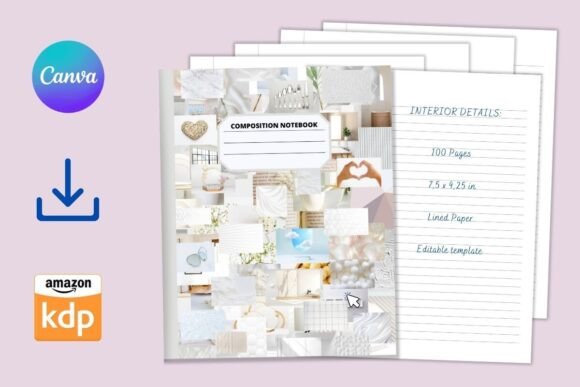
This isn’t a decorative mockup masquerading as a working tool. Every element serves a practical purpose. The cover features a collage of white-toned photos—soft, neutral, and intentionally uncluttered—creating visual breathing room rather than visual noise. That tonal restraint isn’t arbitrary; it ensures text overlays remain legible at any scale, and it provides a consistent backdrop whether you’re adding a title in bold sans-serif or a subtle handwritten-style subtitle. More importantly, the entire composition is built to function across devices and skill levels: all layers, text boxes, and color fields are fully editable in Canva’s free version. No upgrade prompts, no locked assets, no hidden paywalls.
The interior follows the same principle of quiet utility. One hundred lined pages—no blank spreads, no graph paper detours, no decorative headers competing for attention—just clean, evenly spaced lines optimized for handwriting clarity and ink bleed resistance (when printed on standard 70–80 lb text weight paper). Line spacing is calibrated at 8 mm, a proven sweet spot for most adult handwriting styles: generous enough to accommodate cursive loops or technical annotations, tight enough to maximize usable space per page without crowding.
Why This Size and Structure Matter
The 7.5″ × 9.25″ dimension is more than convention—it’s convergence. It fits comfortably in a backpack or tote yet offers ample real estate for diagrams, side-by-side notes, or multi-column layouts. It aligns precisely with KDP’s “Standard Trim Size” guidelines for paperback interiors, meaning zero manual resizing or margin recalculations when preparing files for print-on-demand. For educators designing custom student workbooks, researchers compiling field notes, or small business owners creating branded client journals, that compatibility eliminates a common friction point: the gap between design and deployment.
Consider a high school science teacher building a lab notebook for her biology unit. She can insert her school logo into the front cover, adjust the spine color to match department branding, and add a course code in an editable label—all within minutes. Then, using the same template, she duplicates the lined page master and inserts pre-formatted experiment tables on select pages—preserving line consistency while layering structure where needed. That flexibility emerges not from feature bloat, but from intentional scaffolding: the template gives you anchors, not constraints.
Full Editability Without Compromise
Editability here means more than swapping colors. It means:
- Front and back cover layouts include separate, non-merged layers for background collage, title text, subtitle, and optional author/brand attribution—each independently movable, scalable, and style-adjustable.
- The spine is a discrete, labeled element—not fused with the cover image—so changing its color or font doesn’t distort alignment or require pixel-level repositioning.
- Lined pages use Canva’s native line-drawing tools (not rasterized images), so zooming in reveals crisp vector edges—not blurry pixels—and scaling maintains fidelity.
- All typography defaults to Google Fonts available in Canva’s free library (e.g., Inter, Poppins, Space Grotesk), ensuring cross-platform rendering consistency whether viewed on mobile, desktop, or exported to PDF.
This level of control matters most when iteration is part of the process. A freelance writer testing different journal formats for client deliverables can duplicate the base template, adjust line height by 0.5 mm for tighter note-taking, change the cover’s photo collage to reflect project themes, and export three variants—all before lunch. No plugin dependencies. No learning curve beyond Canva’s intuitive drag-and-drop interface.
Practical Applications Across Disciplines
The strength of the Notebook Cover and Lined Pages Template lies in its quiet adaptability—not in prescriptive use cases, but in how seamlessly it supports divergent workflows.
Educators use it to build discipline-specific notebooks: history teachers embed primary source citations in footer placeholders; math instructors add margin guides for problem-solving steps; language arts specialists insert weekly reflection prompts on alternating pages—all while preserving the underlying lined structure. Because the template exports cleanly to PDF, printed copies retain sharp text and consistent margins, critical for classroom reproducibility.
Researchers and academics rely on its stability during longitudinal projects. Field anthropologists annotate interview transcripts directly onto lined pages, knowing the uniform layout supports chronological scanning later. Lab scientists maintain procedural logs where page numbering (manually added via Canva’s page counter) creates auditable sequences—no risk of auto-numbering glitches found in some word processors.
Creatives and entrepreneurs treat it as a brand extension canvas. A ceramicist designing a workshop workbook adjusts the cover’s white-toned collage to feature studio shots, changes the spine color to match her glaze palette, and adds a small logo watermark to each lined page—subtle, professional, and fully under her control. For solopreneurs launching digital products, the notebook becomes a tactile companion to online courses: printed exercises, reflection prompts, and implementation checklists—all grounded in the same trusted format.
Exporting, Printing, and Publishing Considerations
When exporting, always choose “PDF Print” (not “PDF Standard”) in Canva. This preserves CMYK-ready color profiles and embeds fonts—essential for KDP uploads where missing fonts trigger rejection. Bleed is intentionally excluded from this template: the 7.5″ × 9.25″ dimensions reflect final trim size, so no additional bleed setup is required. Margins are set conservatively (0.5″ inner, 0.4″ outer, 0.6″ top/bottom), accommodating binding shifts without sacrificing usable space.
For home printing, standard letter-sized (8.5″ × 11″) paper works with minimal adjustment: simply select “Scale to Fit” in your printer settings. The result is a slightly smaller but fully functional notebook—ideal for prototypes, student samples, or rapid ideation cycles. For KDP, upload the single PDF containing all 100 interior pages plus front/back covers as separate files per KDP’s requirements (interior = one PDF, cover = another), and the system handles imposition automatically.
What This Template Doesn’t Do—And Why That’s Strategic
It doesn’t include pre-written content. There are no motivational quotes, no calendar grids, no habit trackers. It doesn’t auto-generate page numbers or enforce a specific binding method. And it doesn’t assume you’ll use every page. That restraint is deliberate. Filling space with features often dilutes focus; this template prioritizes what remains constant across use cases: a reliable surface for handwriting, a coherent visual identity, and uncompromised editability. It assumes competence—not expertise—and meets users where they are, whether they’ve used Canva for five minutes or five years.
It also avoids over-engineering for hypothetical edge cases. There’s no “dark mode” toggle (Canva’s interface handles display preferences), no animated transitions (irrelevant for static print), and no cloud-sync dependencies (your edits save locally in Canva’s editor until you export). What persists is what matters: the integrity of the line, the neutrality of the cover, and the fidelity of the output.
Getting Started Is Literally Two Clicks Away
No installation. No account upgrades. No file conversion headaches. Open Canva, search “Notebook Cover and Lined Pages Template”, select the design, and begin editing. Change the cover’s dominant photo with a drag-and-drop from your device or Canva’s free photo library. Adjust the label color to complement your brand palette using the eyedropper tool. Modify the spine font weight to enhance readability at thumbnail size. Duplicate a lined page, insert a sketch, and continue writing—without breaking rhythm.
That immediacy—combined with structural rigor—is what transforms a template from a starting point into a thinking partner. It doesn’t tell you what to write. It ensures that whatever you write lands with clarity, consistency, and quiet confidence.