Habit Tracker, KDP
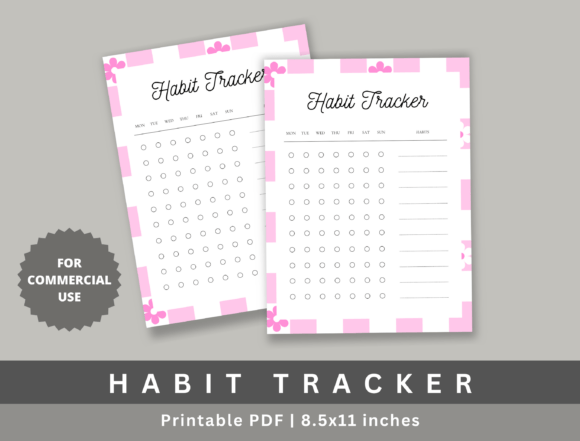
For creators building low-content products on Amazon KDP, consistency, speed, and quality aren’t optional—they’re operational necessities. The Habit Tracker, KDP is a single-page, print-ready PDF designed not as an afterthought, but as a precision tool built into your publishing workflow from day one. It’s not a journal or planner in itself—it’s a modular, high-fidelity interior page you drop directly into existing or new KDP titles: habit journals, productivity planners, wellness workbooks, or even themed self-improvement bundles.
This isn’t a template requiring design software, layer adjustments, or font substitutions. It arrives at 8.5 × 11 inches, CMYK-ready, 300 DPI, with bleed-safe margins and KDP-compliant spacing—meaning zero reformatting before upload. You open the file, place it where needed (typically as page 2 or within a dedicated tracking section), and proceed. That level of readiness transforms how quickly you move from concept to live listing—especially when managing multiple SKUs or seasonal product lines.
Where It Fits in Your Publishing Process
The Habit Tracker, KDP operates most effectively when treated as a functional asset—not just a decorative element. Think of it like a pre-vetted component in a manufacturing line: tested, calibrated, and ready for integration.
Before launch: During title planning, you map out interior structure—cover, intro, instructions, trackers, reflection prompts, resource pages. The Habit Tracker, KDP serves as a plug-and-play anchor for the “tracking” segment. Its clean grid layout, intuitive labeling, and balanced white space eliminate guesswork about column width, row height, or visual hierarchy. You don’t sketch wireframes—you verify alignment, test pagination, and confirm readability across device previews—all in under five minutes.
During production: If you’re assembling interiors in Canva, Affinity Publisher, or Adobe InDesign, this graphic imports cleanly as a PDF or high-res PNG. No transparency issues. No missing fonts. No color shift between screen and proof. That reliability reduces revision cycles—particularly valuable when working with virtual assistants or freelance designers who need minimal direction and zero troubleshooting.
After launch: When customers leave reviews mentioning “great tracker layout” or “easy to use daily,” that reinforces perceived value—and supports organic ranking for terms like *habit tracker printable*, *daily habit journal interior*, or *KDP planner page*. Because the design meets real user expectations (clarity, legibility, purpose-built spacing), it contributes to lower return rates and higher repeat purchase likelihood across your catalog.
Integration With Real Workflows
How you use the Habit Tracker, KDP depends less on the file itself and more on how it connects to your broader systems.
- For educators and coaches: Embed it inside downloadable workbooks or paid Notion + PDF bundles. Pair it with a short video walkthrough (“How to Use This Tracker”)—the clean layout makes screen-sharing intuitive, and students can print or annotate without distortion.
- For freelancers and solopreneurs: Insert it into client onboarding kits—e.g., paired with a 30-day goal-setting guide. Its commercial-use license means you can brand it subtly (a small logo in the footer) without violating terms, reinforcing your authority while delivering immediate utility.
- For publishers scaling seasonal collections: Use it as a consistent “anchor page” across Q1 wellness journals, Q2 focus planners, and Q4 reflection workbooks. Readers begin recognizing your design language—building trust and reducing cognitive load across titles.
It also interfaces cleanly with external tools. For example, if you’re using Trello to manage KDP launches, you might tag cards with “✅ Habit Tracker inserted” once placed. If you track sales by interior feature in a spreadsheet, this page becomes a measurable variable—helping you assess whether titles with robust tracking sections convert at higher rates than those without.
Practical Implementation Tips
Start simple—but think ahead. Here’s how to maximize utility without overcomplicating:
- Test print before bulk upload. Even with KDP compliance, run a physical proof. Check margin clearance, especially near the spine edge. The Habit Tracker, KDP is built to avoid cutoff, but verifying ensures peace of mind—particularly if you’re bundling it with other interior assets that may have different margin tolerances.
- Match tone, don’t match fonts. You don’t need to replicate the tracker’s typography elsewhere in your interior. Instead, ensure contrast ratios meet accessibility standards (4.5:1 minimum for body text), and that heading weights visually signal hierarchy—even at thumbnail size in KDP search results.
- Use it to reinforce structure—not replace instruction. Place it after a brief “How to Use This Tracker” page (2–3 sentences max). That context boosts usability, especially for first-time journal users. The tracker shines because it’s self-explanatory—but a sentence or two sets intention.
- Leverage its commercial license intentionally. You’re allowed—and encouraged—to use it in client deliverables, digital courses, or physical workshops. Just ensure final output maintains the original resolution and proportions. Upscaling or stretching distorts grid integrity, which undermines the very functionality it was built to deliver.
Quality Control and Long-Term Use
Because the Habit Tracker, KDP requires no editing, its long-term value lies in consistency—not customization. That’s intentional. Every time you reuse it across titles, you strengthen design coherence, reduce QA overhead, and accelerate time-to-market. There’s no version drift. No “which font did I use last time?” uncertainty. Just a known, reliable component.
From a quality control perspective, treat it like a spec sheet: verify once, trust always. Keep a master copy in a dedicated “KDP Assets” folder—named clearly, backed up, and tagged for quick search (e.g., “habit-tracker-kdp-300dpi-cmyk”). When onboarding a new designer or VA, share that file alongside a one-paragraph usage note—not a multi-step tutorial. That clarity compounds over time, especially as your catalog grows beyond 10, 20, or 50 titles.
And because it’s resolution-locked and format-stable, it ages well. Unlike editable templates that depend on specific software versions or cloud links, this PDF remains fully functional in 2025, 2027, or 2030—no updates, no dependencies, no compatibility warnings.
Final Thought: Utility Over Ornament
The strongest low-content products don’t win on novelty alone—they win on silent reliability. The Habit Tracker, KDP succeeds because it removes friction instead of adding features. It doesn’t ask you to learn a new system. It doesn’t require interpretation. It delivers exactly what the name promises: a habit tracker, built to KDP standards, ready when you are.
That kind of operational simplicity lets you focus energy where it matters most—researching audience needs, refining your cover design, optimizing backend keywords, or building your email list. The tracker handles the rest: clear rows, balanced spacing, sharp lines, and immediate usability—page after page, title after title.